
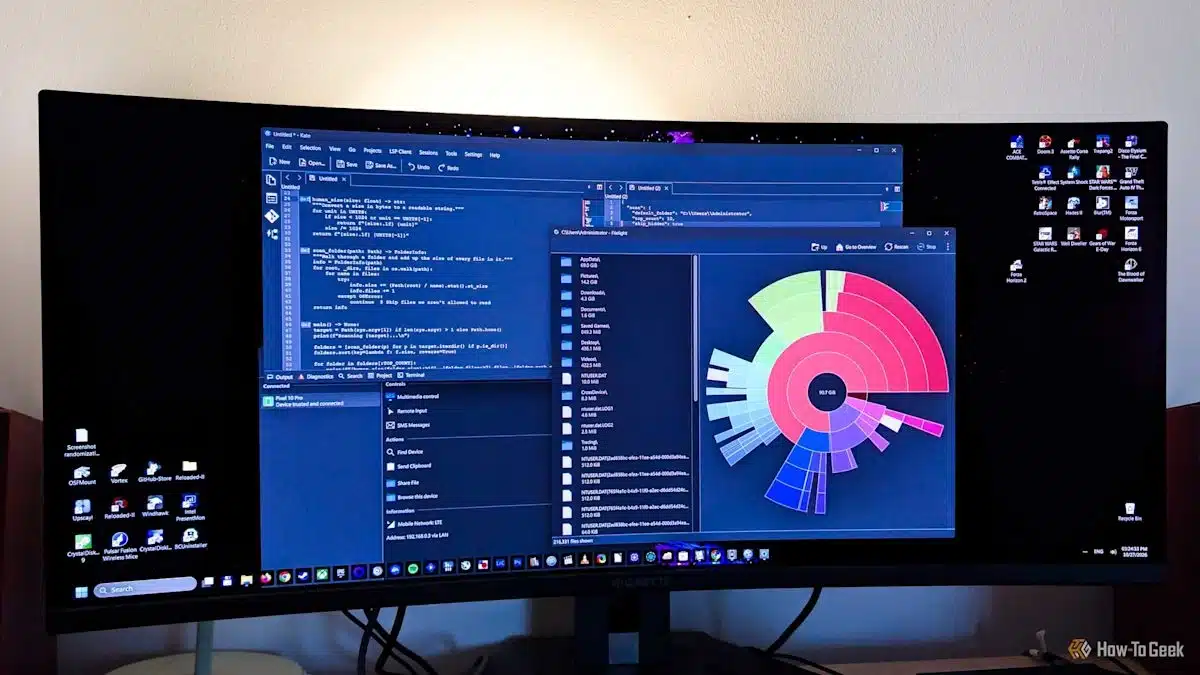
Windows users can get more capable, free alternatives to several built-in apps from software originally developed for Linux. Five standouts offer improvements for managing storage, working with documents, connecting a phone, taking screenshots and editing code.
Filelight maps disk usage as a series of nested rings. The center represents the folder you’re viewing, while the surrounding rings show its contents. Larger sections indicate folders using more space, making it easy to spot what’s filling a drive.
In one example, Filelight revealed that the AppData folder occupied nearly 70GB, including more than 20GB of Spotify cache. Its visual layout can be easier to scan than the treemaps used by tools such as WizTree and WinDirStat. Filelight is also available through the Microsoft Store.
Okular is a versatile document viewer and a feature-rich PDF reader. It supports annotations, notes, text selection and digital signatures, though setting up the certificate for signing can take some work on Windows.
Beyond PDFs, Okular can open formats including EPUB and MOBI ebooks, comic-book files, images and Markdown documents. It’s free, open source and ad-free.
KDE Connect links a phone with a Windows PC. It can share files and notifications, and it offers controls such as using a phone as a computer’s mouse and keyboard, managing media remotely, or making the phone ring when it’s misplaced.
It doesn’t include all of Microsoft Phone Link’s features—such as placing calls or using a phone as a webcam—but it can be a more reliable option. KDE Connect is available for Windows and macOS, though iPhone users may have fewer features than Android users.
Flameshot makes capturing and marking up screenshots straightforward. You can annotate or edit an image directly in the capture overlay, without opening a separate editor. It also lets you blur or pixelate any area of a screenshot.
Windows Snipping Tool includes features Flameshot lacks, such as screen recording and text recognition. But for quickly capturing and editing images, Flameshot offers a focused, easy-to-use alternative.
KDE’s Kate editor brings features such as syntax highlighting, code folding, split view, Git integration and a built-in terminal to Windows. It’s free, open source and doesn’t require an account or include built-in AI features. A Windows version is available from the Microsoft Store.
Kate offers more out-of-the-box functionality than Notepad, while its comparison with Notepad++ comes down largely to preference: Kate includes many features by default, whereas Notepad++ can expand through plugins.
Other Linux-developed apps are available on Windows, too. Kdenlive is a video editor, Elisa is a music player, digiKam manages photos, and Kasts is a desktop podcast player.
ChicagoVPS is your gateway to unparalleled hosting solutions. Our state-of-the-art datacenters and powerful network ensures lightning-fast speeds and uninterrupted connectivity for your websites and applications. Whether you’re a startup looking for scalable resources or an enterprise in need of enterprise-grade hosting, our range of plans and customizable solutions guarantee a perfect fit. Trust in ChicagoVPS to deliver excellence, combining unmatched reliability and top-tier support.
For Inquiries or to receive a personalized quote, please reach out to us through our contact form here or email us at sales@chicagovps.net.


