
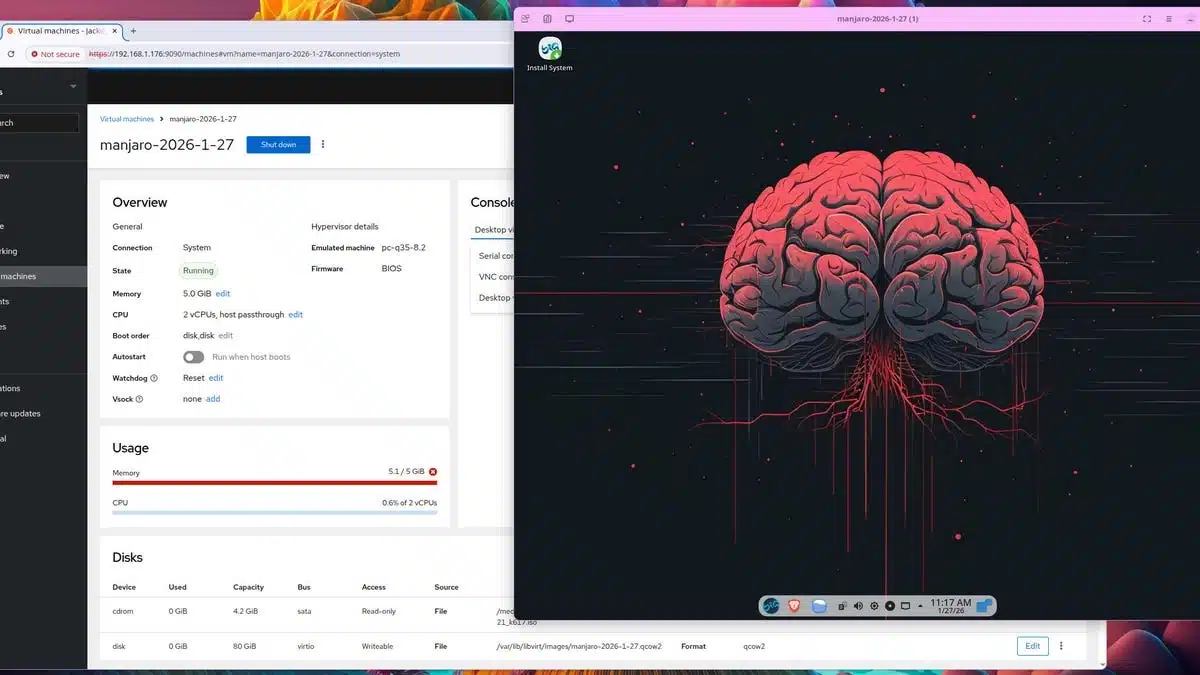
If you’re looking to streamline virtual machine management on Linux, Cockpit is an ideal solution. This tool not only allows local management of virtual machines but also enables remote access from any device on your local network.
Cockpit is a web-based interface that simplifies managing Linux systems, including setting up KVM (Kernel-based Virtual Machine). With a dedicated virtual machines plugin, users can easily:
Install Cockpit: Open your terminal and run the following command to install Cockpit:
sudo apt-get install cockpit -yInstall Virtual Machines Plugin: Then, install the virtual machines plugin:
sudo apt-get install cockpit-machines -yAlternatively, both can be installed in a single command:
sudo apt-get install cockpit cockpit-machines -yAfter installation, access Cockpit via your web browser by navigating to http://<IP>:9090, replacing <IP> with the IP address of the Cockpit host machine. Note that since there’s no SSL certificate by default, you may need to proceed through security warnings from your browser.
Once logged in, on the left sidebar, locate the "Virtual machines" section. Here, you can create a new virtual machine by selecting to download an operating system or use local install media if preferred.
Cockpit is a powerful tool that significantly eases virtual machine management on Linux, making it suited for both local and remote operations. It’s a free and versatile solution that enhances your ability to manage your Linux systems efficiently. With its simple web interface and robust plugin options, Cockpit is an excellent choice for users wanting to maximize their virtual machine capabilities.
For detailed information, you can explore further about interface management with Cockpit.
ChicagoVPS is your gateway to unparalleled hosting solutions. Our state-of-the-art datacenters and powerful network ensures lightning-fast speeds and uninterrupted connectivity for your websites and applications. Whether you’re a startup looking for scalable resources or an enterprise in need of enterprise-grade hosting, our range of plans and customizable solutions guarantee a perfect fit. Trust in ChicagoVPS to deliver excellence, combining unmatched reliability and top-tier support.
For Inquiries or to receive a personalized quote, please reach out to us through our contact form here or email us at sales@chicagovps.net.


