
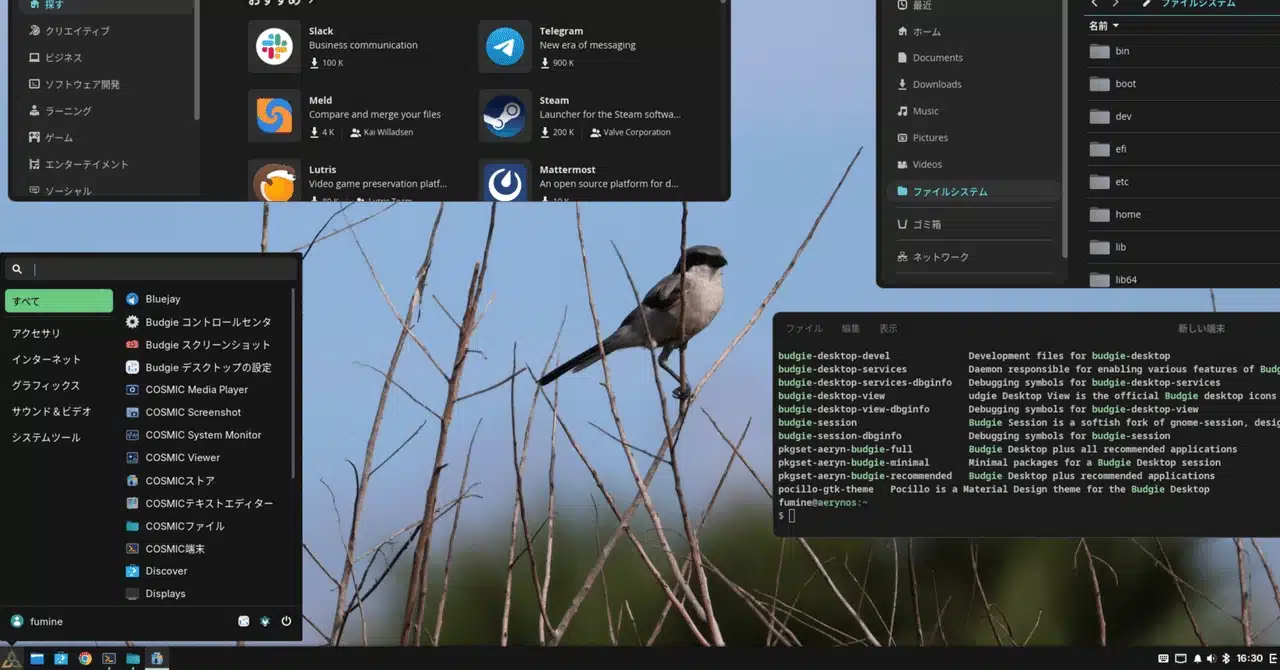
aerynOS, the Linux distribution launched by the team behind Solus, has added Budgie support in its November 2 ISO release. Budgie has long been associated with Solus, and its availability on aerynOS was something I had been hoping for. Since the new desktop is still intended for early adopters, I decided to try it on my main PC, replacing CachyOS Budgie.
The release adds Budgie and, according to the project, around a dozen Wayland compositors, including Hyprland. Budgie appears as an installer option only in the Experimental installer; the Legacy installer still offers GNOME, KDE Plasma, and COSMIC. Because the Experimental installer is still under development, installing with the Legacy version and adding a desktop later may be the safer approach.
The moss package manager’s command structure has also changed. Instead of the older sudo moss install somepackage, packages are now added with:
sudo moss package add somepackageThis wording fits aerynOS’s atomic design, where packages are added to the system rather than installed in the traditional sense. The project’s package-management documentation explains the new approach.
The release also adds support for firewalld. Its implementation is based on nftables rather than iptables. Searching for firewalld with moss returns the firewall daemon, a Qt panel applet, and a configuration application. I chose to continue using nftables directly, since my desktop computer only connects to networks at home.
I first tried the Legacy installer, but it offered only GNOME, KDE Plasma, and COSMIC. Budgie was available through the Experimental installer, along with a choice of the Btrfs file system. However, because aerynOS provides OS rollback, I decided that the simpler XFS option was sufficient.
The Experimental installation took only a few minutes. After restarting, Budgie was running, and startup seemed faster than on CachyOS. Japanese text also displayed correctly without the font adjustments I had needed a year earlier.
The initial Budgie installation included KDE applications such as the file manager, terminal, editor, and music player. I would have preferred a choice between minimal, recommended, and full software sets. I also noticed that the home directory was empty. Although creating only the folders you need can be useful, I suspect this behavior may be a mistake that will be corrected.
I ultimately chose a different route: I installed COSMIC using the Legacy installer, which provided COSMIC versions of the file manager, terminal, editor, and media player, and then added Budgie from the terminal. For the initial installation steps, see the earlier aerynOS installation article.
I followed the Budgie installation instructions, replacing the older install command with package add. To keep the installation minimal, I ran:
sudo moss package add pkgset-aeryn-budgie-minimalsudo moss package add sddmsudo systemctl enable sddmAfter rebooting, Budgie started successfully. A few KDE applications, including Konsole, Dolphin, and Discover, were still present, but that seemed acceptable.
For everyday use, I mainly need Google Chrome to support Japanese input, so I followed the setup described in my earlier installation article. I also configured Shift+Space to switch Japanese input on and off.
On my work laptop, the Half/Full-Kanji key is inconveniently placed. After finding Shift+Space easy to use there, I added the same shortcut to my home computer. With fcitx5 and Mozc, this requires two changes: add Shift+Space under the input method’s global options, then assign the same enable/disable IME command to Shift+Space in the relevant Mozc key settings.
Budgie is now usable on aerynOS, and everyday use feels much like Budgie on CachyOS. I’m looking forward to exploring the distribution’s atomic design and rollback features.
There are fewer available applets in the desktop settings than I have on CachyOS, which is a little disappointing. I’d also like to compare the themes and other Budgie features across distributions.
I did encounter one serious issue: after the computer enters suspend mode, it stops accepting keyboard input. Similar reports suggest suspend problems are occurring as Budgie adopts Wayland. Until this is fixed, I’ve disabled automatic suspend in Budgie Control Center’s power settings. I’ll keep the system updated with sudo moss sync -u and follow the aerynOS and Budgie project updates.
ChicagoVPS is your gateway to unparalleled hosting solutions. Our state-of-the-art datacenters and powerful network ensures lightning-fast speeds and uninterrupted connectivity for your websites and applications. Whether you’re a startup looking for scalable resources or an enterprise in need of enterprise-grade hosting, our range of plans and customizable solutions guarantee a perfect fit. Trust in ChicagoVPS to deliver excellence, combining unmatched reliability and top-tier support.
For Inquiries or to receive a personalized quote, please reach out to us through our contact form here or email us at sales@chicagovps.net.


