
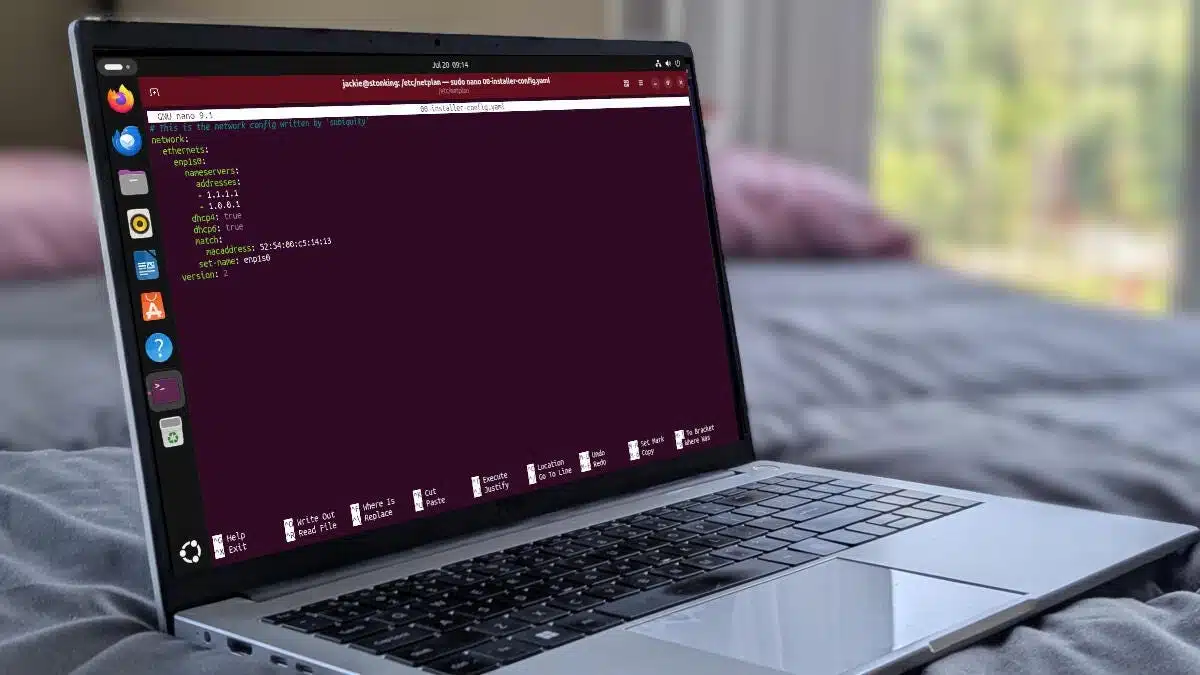
DNS configuration is essential for effective network management, especially when you don’t have access to a graphical user interface (GUI). This guide will walk you through how to set up DNS on Ubuntu-based systems using the command line, particularly via the Netplan tool.
Netplan is the system networking configuration utility for Ubuntu. It enables users to describe network interfaces, specify their configurations, and apply these settings. Configuration files are typically located in the /etc/netplan directory and use YAML syntax.
Open Your Terminal
cd /etc/netplanBackup Your Configuration File
ls command. Typically, the configuration file will start with 00, such as 00-netplan.yaml. Create a backup of this file:
sudo cp 00-netplan.yaml 00-netplan.yaml.bakEdit the Configuration File
sudo nano 00-netplan.yamlnameservers:. If it isn’t there, you can add it. Include your desired DNS servers. For example, for Cloudflare:
nameservers: addresses: - 1.1.1.1 - 1.0.0.1Ensure that your indentation adheres to YAML formatting rules. Improper indentation can lead to errors when applying the configuration.
Save and Close the File
nano, you can do this by pressing CTRL + X, then Y, and Enter.Apply the Changes
sudo netplan applyping google.comCheck Your DNS Settings
resolvectl status | grep "DNS"Configuring DNS on Ubuntu via the command line using Netplan might seem daunting, but it’s straightforward once you understand the process. This method is beneficial for remote management or when GUI access is unavailable. With just a few commands, you can improve your system’s networking capabilities significantly.
ChicagoVPS is your gateway to unparalleled hosting solutions. Our state-of-the-art datacenters and powerful network ensures lightning-fast speeds and uninterrupted connectivity for your websites and applications. Whether you’re a startup looking for scalable resources or an enterprise in need of enterprise-grade hosting, our range of plans and customizable solutions guarantee a perfect fit. Trust in ChicagoVPS to deliver excellence, combining unmatched reliability and top-tier support.
For Inquiries or to receive a personalized quote, please reach out to us through our contact form here or email us at sales@chicagovps.net.


